Bills
Every weekday morning XARA enters and codes each client’s new bills in BILL and has them ready to pay. Nobody at your firm starts it.
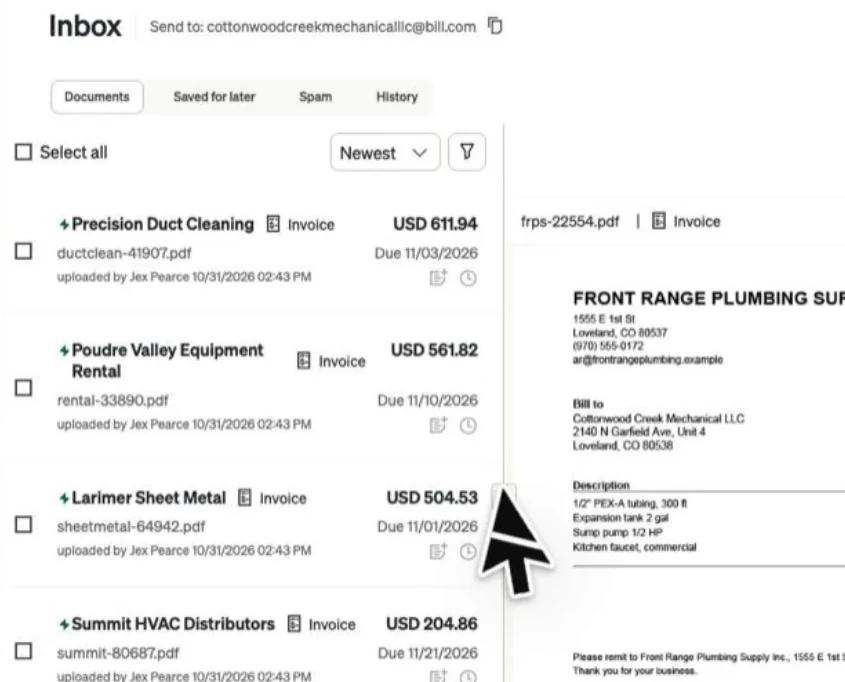
Bills don’t wait for month end. At 6:00 each weekday morning, in your firm’s time zone, XARA opens BILL’s inbox for every client it enters bills for and works through whatever is new. None of this waits for anyone at your firm, and XARA skips a client whose inbox is empty that day.
The pictures on this page come from Cottonwood Creek Mechanical LLC, our test company.
What it does each morning
- Reads each invoice and compares it with BILL’s own reading, fixing the mistakes BILL makes: a subtotal taken as the total, a wrong digit in the invoice number, a vendor with a similar name.
- Codes each bill using that vendor’s past bills and the client’s history.
- Checks that the bill isn’t already in the books before saving it.
- Sets aside anything that isn’t a bill, such as a statement of account, a past-due reminder or a receipt for money already spent.
- Prepares the payment run, the list of bills for the client’s payer to release.
- Follows up on payments that bounce.
XARA enters vendor credits the same way. It works through clients in the order their close is due in Karbon, and at month end it matches BILL’s withdrawals to the bank transactions in QuickBooks, so it counts each payment once.
One bill, start to finish
Precision Duct Cleaning sent invoice 41907 for $611.94, dated 10/19/2026 on Net 15 terms, so it’s due 11/03/2026.
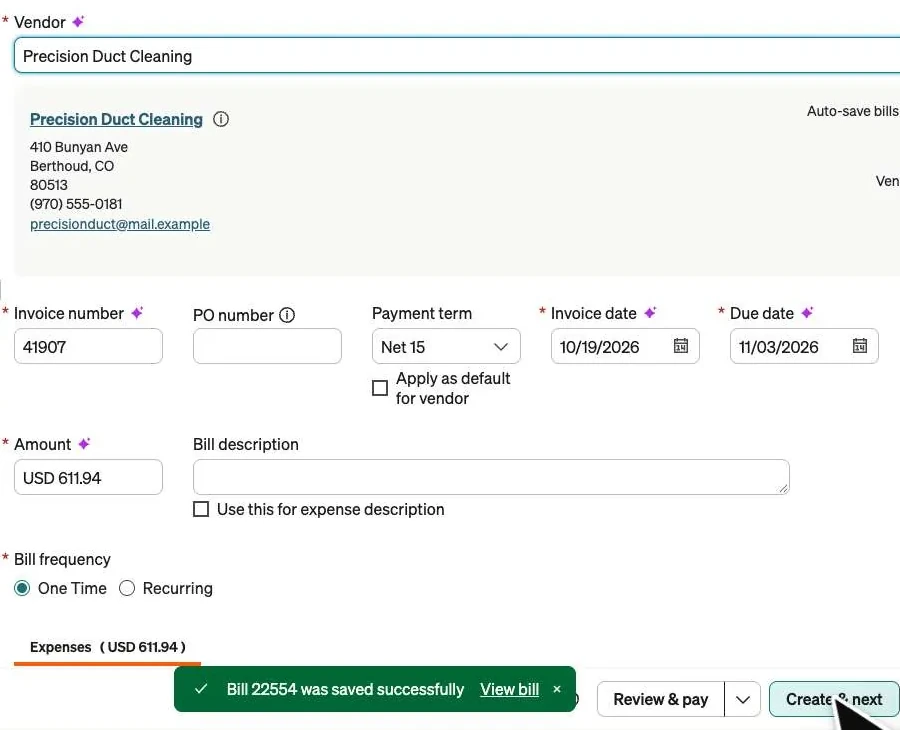
XARA read the invoice beside the form and opened the vendor’s last bills, which were coded to Subcontractors. It coded this one the same way, checked the bill wasn’t already in BILL or QuickBooks, and pressed Create & next. BILL saved it and put the next invoice on the form.
No bill goes in twice
Before XARA saves a bill, its code compares it with everything BILL and QuickBooks hold for that vendor: its bills in every state, archived ones too, and what was paid outside a bill. It reads the vendor, the amount, the dates and the invoice number however it’s written, so INV-0022521 and 22521 are one bill.
New in BILL’s inbox
Front Range Plumbing Supply
- Invoice
- INV-0022521
- Dated
- 10/14/2026
- Amount
- $2,526.66
Already a bill in BILL
Front Range Plumbing Supply
- Invoice
- 22521
- Dated
- 10/14/2026
- Amount
- $2,526.66
One bill, numbered two ways. XARA enters it once and asks you about the copy.
XARA takes the same care with vendors on AutoPay. BILL pays an AutoPay bill the moment it’s saved, so XARA holds the bill and asks you first.
Who pays
Your client pays its own bills. Money moves only when the client’s payer, the person BILL has verified to release payments, releases it in BILL. XARA makes sure each bill is entered, coded and ready by then, and the people who approve bills at your client and your firm keep approving them.
Seeing the morning’s work
Ask your AI whenever you like.
How many bills came in for Cottonwood Creek this morning?
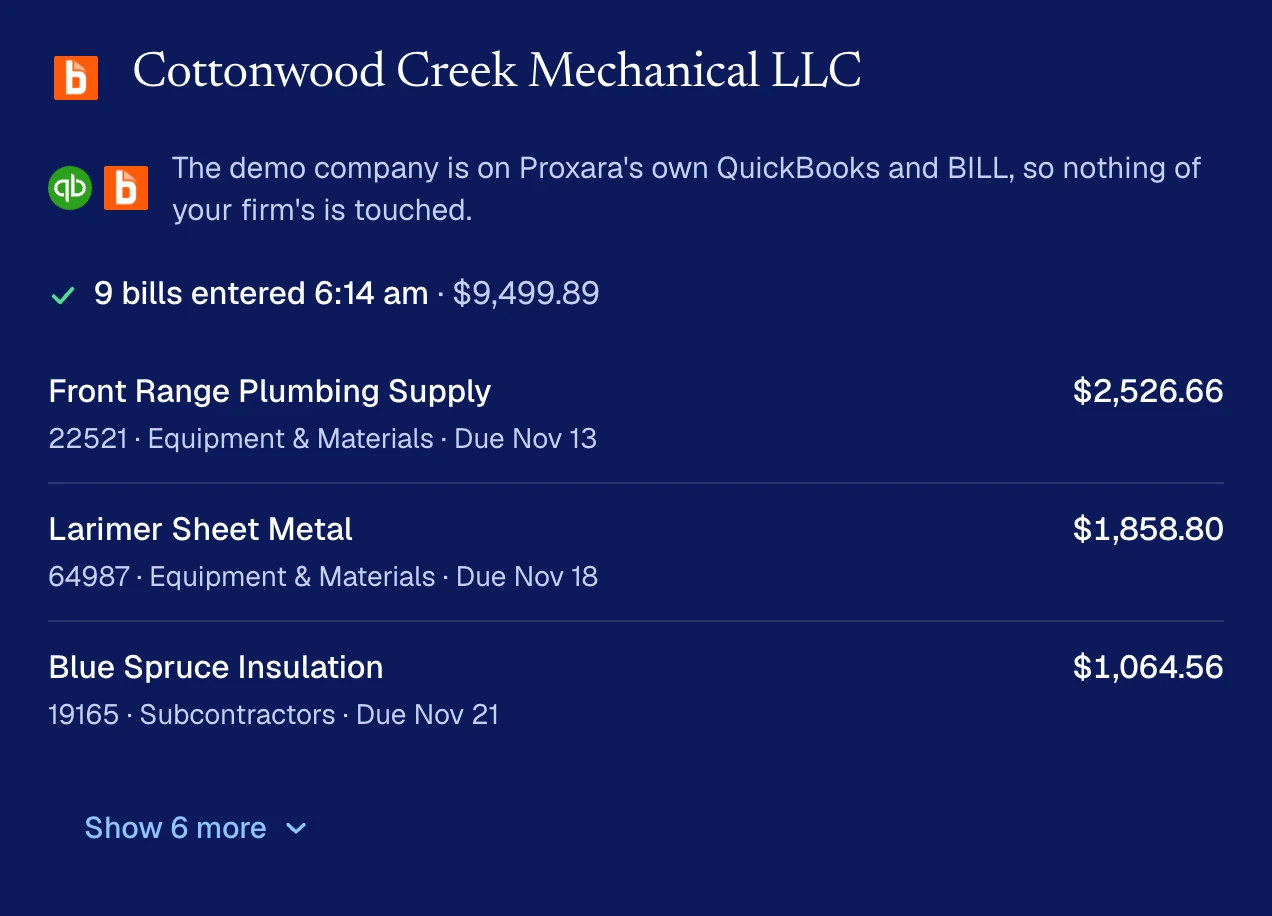
Each person at your firm also gets a morning email for their own clients, with XARA’s questions first and then the bills it entered. The console shows each bill as it’s saved, and you can watch XARA enter one live or replay it later.
Holding bills or entering them early
If a bill shouldn’t be touched, say so. XARA leaves it alone until you lift the hold.
Hold off on Cottonwood Creek’s Blue Spruce bills.
If you’d like a client’s inbox cleared ahead of the morning, ask.
Enter Cottonwood Creek’s new bills now.
Bills and the month
Bills and the month run side by side. If a month starts while XARA is entering a client’s bills, the month waits for the bills to finish, and XARA makes sure BILL has synced to QuickBooks before it delivers the month. XARA closes the month for clients who don’t use BILL in the same way.