Security and data
Where client data sits, what your firm’s AI is given, who can look and how you switch it off.
This is the short version for someone reading the docs. The Security page is written for your reviewer, and the Security Overview in the Trust Center has the detail they’ll ask for.
Where XARA runs
| Part | Where |
|---|---|
| XARA’s computer | One for your firm alone, in your firm’s private cloud in the United States. Its disk is encrypted and backed up every day. |
| Your firm’s data | Its own database next to XARA, holding XARA’s work for your firm and no other. |
| The model | Behind your firm’s own Amazon Bedrock or Azure endpoint, or inside the private cloud itself. |
| QuickBooks, BILL and the rest | XARA works in them on their own screens, as its own user. |
| Your email, files and Karbon | XARA has its own mailbox, and opens client folders and close jobs through the access your admin connects. |
| Other firms | Every firm has its own deployment and its own XARA login. No other firm can reach anything of yours. |
Adding XARA to your firm shows the ways we deploy it.
Whose login XARA uses
XARA has its own user in each piece of your firm’s software, added the way you add any outside bookkeeper, and it signs itself in. Nobody at your firm handles a password or a code. It keeps its passwords in your cloud’s locked store for secrets, and the console and your AI only ever learn whether a login exists.
What stays with your people
People at your firm handle money and messages. XARA’s code reads each button before pressing it and refuses these, whatever anyone tells it:
- Paying a bill or moving money
- Sending anything to a client or a vendor
- Approving or denying a bill, or setting up AutoPay
- Setting a vendor’s bank details
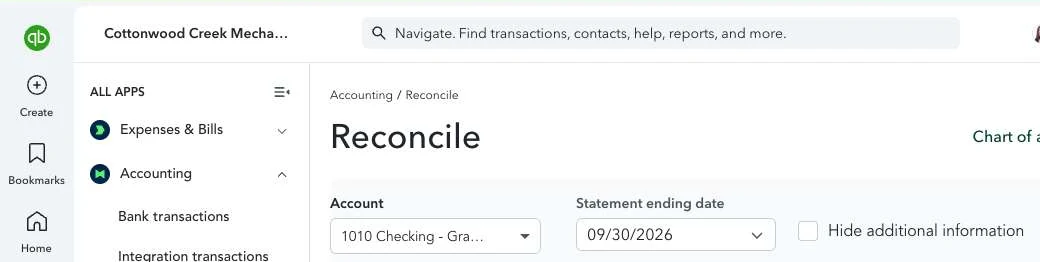
- Changing anything while the screen shows another client’s books
Here’s the last one on Cottonwood Creek Mechanical LLC, our test company. Before XARA changes anything, the page has to show this client’s company name.
What XARA does, and what stays yours covers each one.
What your AI sees
Your people talk to XARA from Claude, ChatGPT or Gemini. Your AI gets the working details it needs to answer: vendors, amounts, dates, accounts, invoice numbers and the client name you typed. XARA removes anything sensitive before passing it on.
Your AI is given
- Client
- Cottonwood Creek Mechanical
- Vendor
- Front Range Plumbing Supply
- Invoice
- 22521
- Amount
- $2,526.66
- Account
- 1010 Checking
Swapped before it leaves XARA
- A tax ID
- [tax id]
- A bank or routing number
- [account]
- A street address
- [address]
- A client you didn’t name
- a code
If you didn’t name a client, your AI only sees a code for it, and XARA’s own window in the chat shows you the name.
Where the model runs
The model that does the work runs behind your firm’s own Amazon Bedrock or Azure endpoint, or inside your private cloud. AWS and Microsoft each state that they don’t use what you send to these services to train the underlying models, and don’t share it with the models’ makers. Their own words are here.
XARA saves what you tell it to remember as notes in your firm’s own database, and never uses them to train a model.
Who can look
| Who | What they can do |
|---|---|
| Your people | Each signs in with their own Microsoft account. Whoever may see a client can act on its bookkeeping. A manager also sets roles, moves clients between preparers and reads the audit. |
| Proxara | Our staff sign in under their own names to deploy XARA and keep it running. What they do appears in your audit as Proxara’s. |
| Your cloud | In a private cloud your firm manages, your own administrators hold the account. Where we host it for you, ours do. |
Replay and audit
XARA keeps each step with what it saw and did, and you can watch a run live or replay it later. It logs each change before making it and checks the result afterwards, so it never does anything twice. The audit shows who started or stopped a month, who answered a question, who approved a step and what anyone told XARA.
Switching it off
| To stop | Do this |
|---|---|
| All of its access to a system | Remove its user in QuickBooks, BILL or wherever you added it. Its access ends with the user. |
| Its work on one client | A manager takes it off that client from the client’s page in the console. |
| A run | Press Stop, in the chat or the console. What it has finished stays finished. |
| A person’s access | A manager removes them on People. Their way into the console and to XARA in your AI ends at once. |
| Everything | If your firm manages the private cloud, shut down the deployment in your own account. |
Ask your reviewer to start with the Security page. Questions go to security@proxara.ai.