Statements, checks and documents
Where XARA finds what a month needs, how it reads a statement and a check, how it reconciles, and what it leaves in the client’s folder.
A bookkeeper spends much of the month finding paper and reading it. XARA does that part too, and it reads a statement the way a careful person would: every row, added up to the cent.
The pictures and figures on this page are from Cottonwood Creek Mechanical LLC, our test company. Alpine Hearing Center and Juniper Street Dental are names we made up to stand beside it.
Where XARA looks
XARA looks where your firm already keeps a client’s papers, starting with the files saved since the month began:
- The client’s documents and close job in Karbon.
- The client’s folders in your firm’s SharePoint or OneDrive.
- XARA’s own mailbox at your firm.
- The statements QuickBooks holds from the client’s bank.
- The client’s payroll, card-processor and bank sites, wherever XARA has a login of its own.
Giving XARA every client’s statements at once
Download the month’s statements from the banks and hand over the whole pile.
Here are September’s statements
A window opens in the chat. Drop the files in together, up to 24 MB each.

XARA reads the client’s name and the last four digits of the account from each statement and files it with that client’s documents. If a file names no client, or more than one, XARA doesn’t guess. It asks you whose it is, with the likeliest client first, so one client’s bank details never end up in another client’s files.
A missing statement doesn’t stop a month. XARA does everything else and asks for it once. If an account has no statement at all, tell XARA the ending balance and the date, and it reconciles to those.
How XARA reads a statement
A statement can be a PDF, a scan or a photo. If one file covers several accounts, XARA reads it as several statements, each with its own account number, dates, balances and rows.
XARA then checks its own reading: the rows have to add up from the opening balance to the closing balance, to the cent. If a statement doesn’t add up, XARA doesn’t use it, and tells you which file it was and why in plain terms.
Check images
The bank feed shows a check’s number and amount, but not who was paid. Many banks print a picture of each cashed check in the statement, so XARA finds the picture and reads the payee’s name.
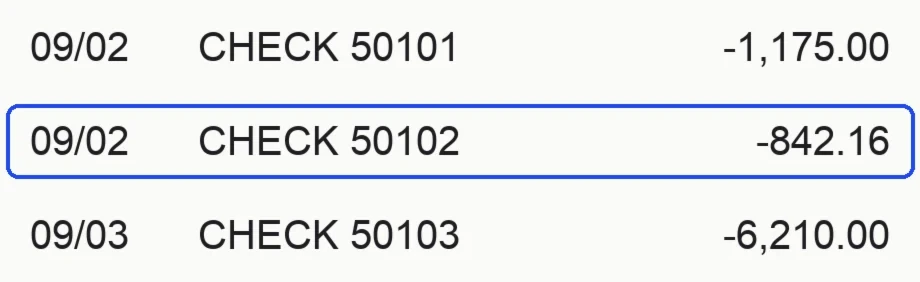 The check image shows who was paid
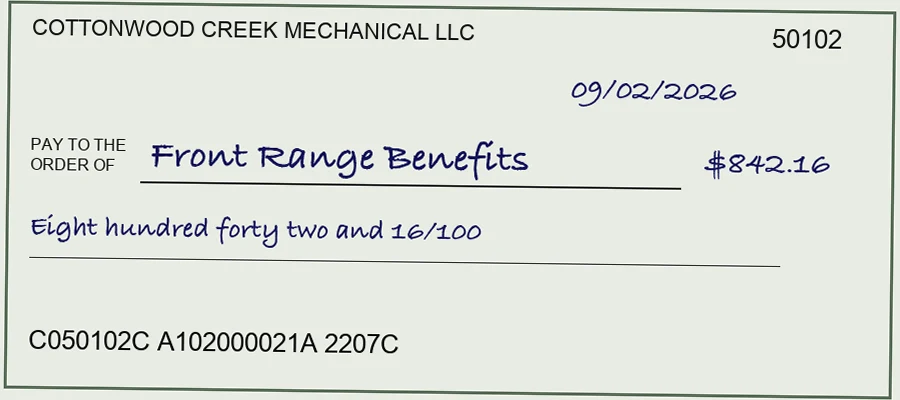
XARA checks the amount on the picture against the bank feed, then codes the check the same way as that payee’s earlier checks. If it can’t read the name for certain, it doesn’t guess. It holds that one transaction and asks who was paid.
Reports XARA uses to split transactions
Some documents tell XARA how to split a single bank transaction.
| The document | What XARA does with it |
|---|---|
| Payroll register | Splits each payroll into wages, taxes and the rest, the same way as the client’s earlier payrolls. If the payroll provider already writes the entries, XARA matches the bank transaction to them and adds nothing. |
| Card processor’s payout report | Splits a deposit so XARA enters the full sales amount and books the fees as an expense. |
| Loan statement | Splits a payment into that month’s principal and interest. |
Reconciling to the statement
Reconciling proves the books agree with the bank. You start from the bank’s ending balance, take off anything in the books that hasn’t reached the bank, and see whether you land on the books’ own figure. The gap is the difference, and a finished account has a difference of $0.00.
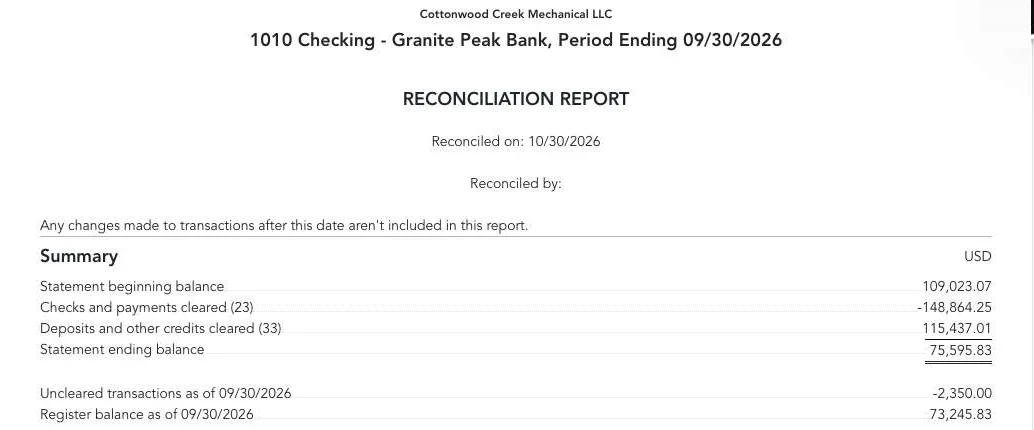
Here is 1010 Checking for September at the test company.
| 1010 Checking, September 2026 | Amount |
|---|---|
| Beginning balance | $109,023.07 |
| 23 payments cleared | −$148,864.25 |
| 33 deposits cleared | $115,437.01 |
| Statement ending balance | $75,595.83 |
| Check 1167, outstanding | −$2,350.00 |
| Balance in the books | $73,245.83 |
| Difference | $0.00 |
Check 1167 was written in September and hadn’t reached the bank by month end, so it stays outstanding and XARA tells you about it when it finishes.
On QuickBooks’ reconcile page, XARA ticks exactly the entries the statement holds and leaves the rest unticked. It presses Finish now only when the difference reads $0.00. QuickBooks’ own report shows the same figures.
When an account won’t reconcile, XARA looks for the reason. A difference that divides by 9 points to two digits swapped in an amount. A difference the size of one transaction points to a missing transaction, and twice that size points to a wrong sign or a duplicate.
XARA never posts an adjustment to make a reconciliation read $0.00, because that hides what’s wrong. It leaves the reconcile open and tells you the difference and what it checked.
What XARA saves to the client’s folder
When the bookkeeping is done, XARA saves these to the client’s folder:
| The file | Where it comes from |
|---|---|
| Profit and Loss, Balance Sheet, General Ledger and Trial Balance | XARA exports them from QuickBooks for the month. |
| A reconciliation report for each account | QuickBooks’ own report, which XARA saves when it reconciles the account. |
| XARA’s notes on the month | Each transaction with how XARA coded it and why, each change it made, and the open items you should know about. |
| A one-page summary | What was done, anything unusual and what is still open, in plain sentences. |
XARA delivers the month only once QuickBooks has each transaction coded as decided and each bank and card account reconciled to $0.00, or left the way your firm asked.
Next, read What XARA does, and what stays yours.