Questions
What a firm’s leaders and its IT ask first, with short answers.
The work
What does it do in a month?
XARA enters each client’s bills, codes the bank and card transactions, reconciles each account to $0.00, drafts the month-end entries and builds the client’s monthly pack once your firm signs off, in whatever software the client uses. The Introduction shows each step.
What happens to the hours?
For the clients you give it, XARA does the bookkeeping and you answer the few questions it asks. Those hours come back to you, for more clients or for the work only a person can do.
How long does a month take?
On Cottonwood Creek Mechanical LLC, our test company, September took 1 hour 41 minutes from start to delivered. You don’t need to do anything while it runs.
How many clients can it work at once?
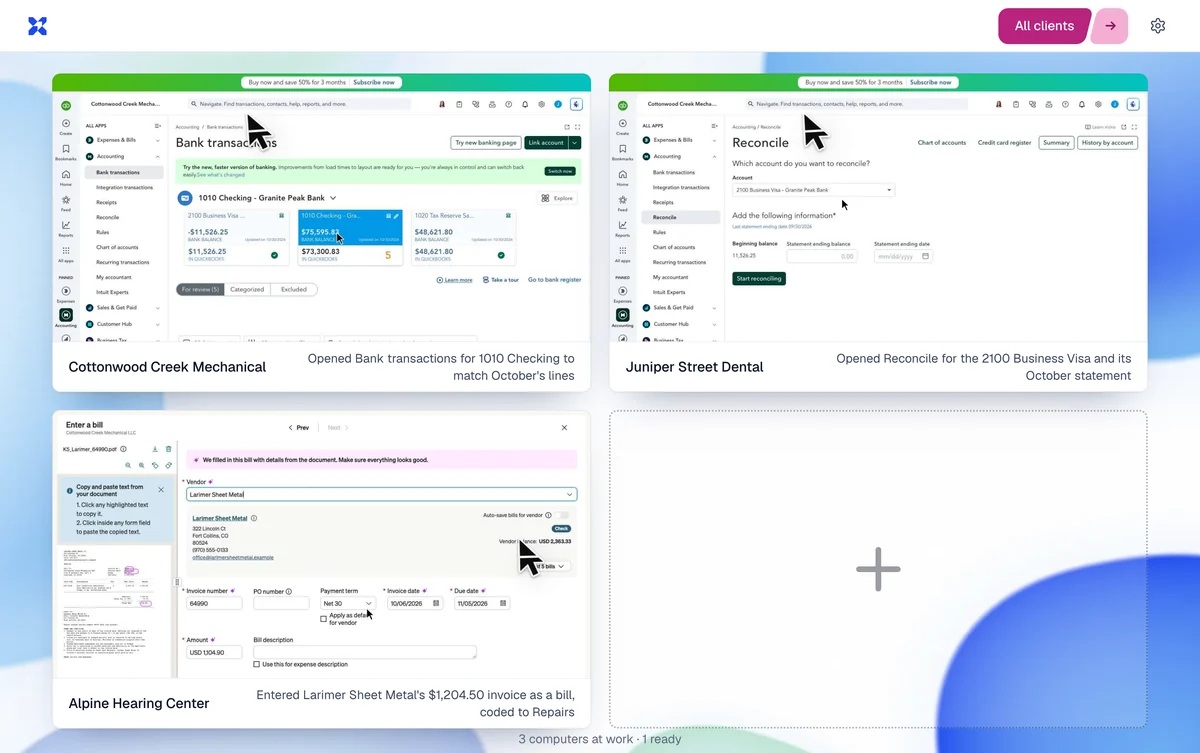
XARA works on several at once, each on its own screen, and you can watch any of them. Start a batch together and come back to the transactions that need you. The picture is our test firm’s console.
Can I teach it how we do things?
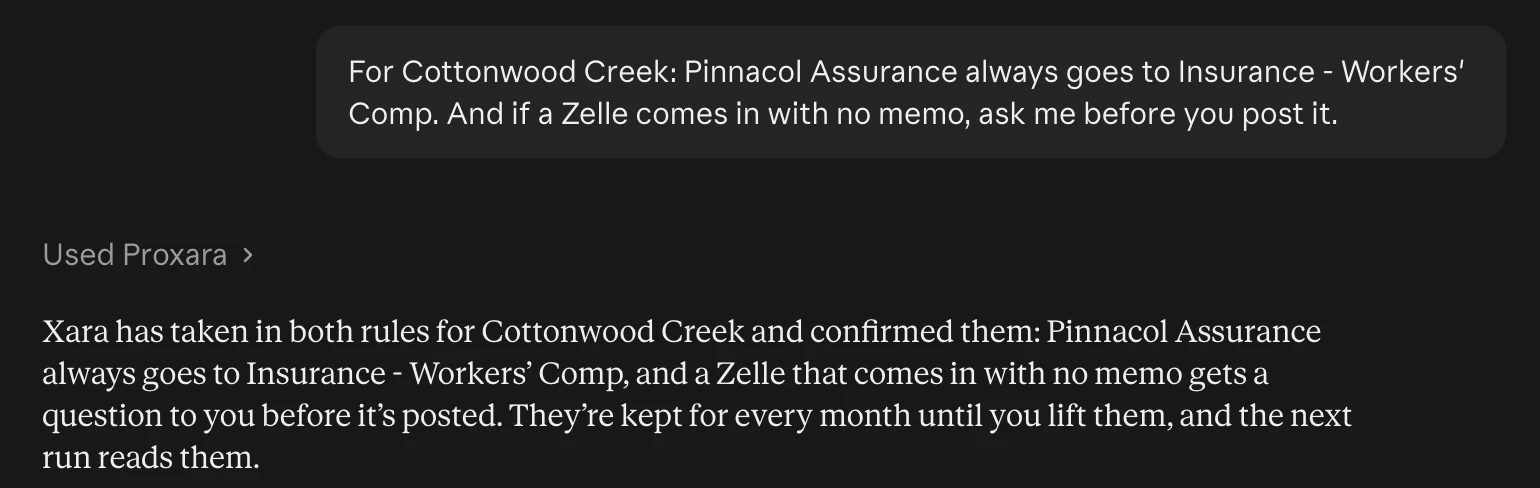
Tell it in a sentence, for one client or for all of them. It keeps your rule in that client’s notebook, reads it at the start of every run and follows it every month until you change it.
What if I’d have coded a transaction differently?
Tell XARA. It changes the transaction, checks that the month still matches the statements, delivers the reports again and remembers for next month.
What if people at my firm work in the same books?
XARA leaves your firm’s own entries as they are and works around them. If someone at your firm edits something XARA did, XARA saves that as a note and follows it from then on.
What if a statement is missing?
XARA looks where a bookkeeper would, in the client’s folder in Karbon or SharePoint and in QuickBooks, and then asks you for it once. Drop the file in the chat or the console.
Can I see what it’s doing?
Yes, live or afterward, step by step. Watching and replaying shows how.
Your clients
Who pays the bills?
Your client’s payer, as before. XARA enters and codes the bills, and its code won’t let it release a payment.
Will my clients hear from it?
Only through your firm. When a question is for the client, XARA drafts the email in your Outlook and someone at your firm sends it. In their books, clients see XARA as a user at your firm’s own address.
What about clients who aren’t on BILL?
XARA closes their month the same way. The morning bills run is for clients on BILL.
How do we add a client?
Add XARA as a user in that client’s accounting software, and in BILL if the client uses it. XARA notices, finds the client in Karbon and is ready for its first month.
Your IT and security
Where does it run?
We deploy and provision XARA for your firm in a private cloud environment in the United States, in US East or US West. In a customer-managed deployment it runs in a VPC in your own AWS or Azure account, and its model runs behind your own Amazon Bedrock or Azure endpoint. For an additional fee, we host the model inside your VPC.
If your firm has no AWS or Azure environment of its own, we host your deployment for you.
Does it train on our books?
No. XARA never uses what it reads or writes to train a model. In a customer-managed deployment the model runs behind your own Amazon Bedrock or Azure endpoint, in your account and under your own agreement with AWS or Microsoft. Both state that they don’t share what you send to those endpoints with the model’s maker or use it for training.
What does it sign in as?
A user of its own that you add, at an address on your firm’s domain, with the role you’d give an outside bookkeeper. It works your firm’s software on its own screens, with no exports and no imports.
How do our people sign in?
With their own Microsoft accounts. A console session lasts twelve hours, and Sign out ends it everywhere.
Who at our firm sees which client?
Each person sees the clients they’re allowed to see in Karbon, their own first. A manager sees every client and sets the firm’s options. Remove a person and their access ends at once, in the console and in the chat.
What does our AI see?
Only the answer you asked for. XARA masks tax IDs, bank account numbers and street addresses before it sends an answer.
Can I see what it did?
XARA logs each change before it makes it and checks the result afterwards. You can replay any month step by step, and a manager can read the audit of who asked for what.
How do we switch it off?
Remove its user from your software and its access ends there and then. Pressing Stop in the chat or the console ends a run that’s under way.
Will you work with our IT and our security review?
Yes. We complete your questionnaire, sit down with your IT and fit the deployment to your identity, network and logging requirements before anything is installed. The Trust Center has the documents your counsel will ask for.
Getting started
What software does it work in?
XARA works in whatever software your firm uses: QuickBooks Online, Xero, BILL, Gusto, your email, SharePoint, Karbon and the rest. You talk to it in Claude, ChatGPT or Gemini.
What does it cost?
Ask us on a demo, and we’ll price it for your firm.
Your next step is a demo. Pick one simple client and we’ll run its month with you on a call.